Friday, September 25, 2020

Android 11 Screen Recording

Android 11 is rolling out to phones world wide and I wanted to highlight one of my favorite new features, Screen Recording!   Now I heard rumors this was added in Android 11, thus I went hunting for it when my phone received the update.  But alas, I couldn't find it anywhere!  So I'm going to cover  how to find it if it doesn't appear on your phone, as well as how to use it.


How to add Screen Recording to the Android 11 quick settings menu

  1. Pull down the quick settings menu and select the edit pencil option


  2. In edit mode of the Android Quick Setting Menu you should find the "Screen Record" option.  Simply drag it up to the list of options that should appear.


 How to use the Android 11 Screen Recording Feature

Once added to the quick settings menu (see above) screen recording can be activated just about anywhere.  When you select the screen record option you're given a few options before recording can begin.

  • Record Audio
    • Gives you the option to record you call phones Microphone, Device Audio, or both.
  • Show touches on screen
    • Will display a dot on the video recording when and where you touched the screen.  A great feature for Android how to videos!

Clicking the start button begins a countdown.  After 3 seconds the recording will start and you can begin.   

When complete, simply pull down the notifications bar and you'll find the option to stop recording.


Once stopped, a notification will appear with the screen recording.  From there you can View, Share or Delete the recording.  

Note: Unlike shooting photos and video, screen recordings are not automatically uploaded to Google Photos.

Leave me a comment about how you're using the new screen recording feature, and other cool new things you found in Android 11!


Monday, March 18, 2013

ASUS PadFone Infinity - First Look

Image credit: ASUS
The new ASUS PadFone™ Infinity.  Featuring a 5-inch Android 4.1 Smartphone that can be coupled to a 10.1-inch full HD tablet display. It's designed for those looking for the abilities of both a tablet and Smartphone without having two entirely separate devices.

Overall specs of the phone places it in the high end range, with a Qualcomm® Snapdragon 600 quad-core (1.7GHz) processor with an Adreno 320 GPU.  2GB of ram, and 32-64GB of eMMc Flash storage.  With its 5-inch Smartphone display featuring a resolution of 1920x1080 pixels giving you full HD on the capacitive multi touch panel. Featuring both 3G and 4G LTE capability with up to 19hours talk time on the 2400mAh Li-Polymer battery(pushed up to 40hrs when docked with the tablet).  It has a sleek aluminum alloy unibody design with a brushed metal finish. 

The tablet side of this offers a 10.1-inch Full HD 1920x1080 pixel Capacitive Multi touch display.  An additional 19Whr battery which extends battery life up to three-times longer.  And an additional front facing camera.

Overall a great idea, and my only qualms about it is they may have pushed the phone screen size just a little too much.

Check it out at the link below:
http://www.asus.com/Tablets_Mobile/PadFone_Infinity#overview

Sunday, March 17, 2013

The ASUS Transformer AiO, Blurring the Lines Between Tablet and PC

Image credit: ASUS
In an attempt to blur the lines between Tablet and PC, ASUS recently announced it's dual OS Transformer AiO.   Featuring the ability to seamlessly switch between Windows 8 and Android 4.1, this machine is a bit of a beast, but has some great potential.

The machine has a somewhat unique dual processor design, with a NVIDIA® Tegra® 3 Quad-core CPU in the tablet and an additional 3rd generation Intel® Core™ processor in the desktop PC station, giving it plenty of processing power.  It's 18.4-inch screen features a resolution of 1920x1080, giving you full HD and appears to be higher than most desktop monitors of it's size.

Additional features in it's dock include 8GB of memory, a 1-2TB hard drive, Nvidia GeForce GT 730M discrete graphics, 4 USB 3.0 ports and one USB 2.0 port, DVD burner, HDMI out and a 1MP front-facing camera.

The tablet side of the ASUS Transformer AiO features the 18.4-inch 10 finger multi touch display, 32GB eMMc Flash, 802.11 a/b/g/n Bluetooth V3.0 EDR, 2 x 1.5W speakers, MicroSD card reader, and much more.

The tablet can function as a remote virtual desktop connecting wirelessly to the dock giving you the ability to run Windows 8 and associated apps.  According to ASUS the Transformer AiO has the ability to seamlessly switch between operating systems with one button push.

Overall due to its 18.4" and 5.3 lbs size, it's not the most backpack friendly tablet, but its abilities would be well suited for an office or home environment where a fixed location PC just doesn't always work.

Thursday, March 14, 2013

The Samsung Galaxy S4 is here.

Courtesy of Samsung
Described as "Mindblowingly thin," by Samsungs director of product marketing Ryan Bidan, the Galaxy S4 handset takes almost every spec to the extreme.

  • 5inch Super AMOLED display thats 1920x1080, pushing pixels per inch to a whopping 441.
  • 1.9 GHz Quad-Core Processor / 1.6 GHz Octa-Core Processor The selection of AP will be differed by markets.
  • Runs Android 4.2.2 Jelly Bean, the most up-to-date version of Android you can get right now.
  • Ultra sensitive screen that lets you navigate via long fingernails or even gloves.  
  • Measures 136.5mm long by 70.6mm wide and weighs only 130 grams.
  • It's overall build is a durable plastic, which was selected for several reasons according to Samsung.  Unlike glass the plastic does not smash, its also cheaper and easier to manufacture than aluminum.
  • 13-megapixel rear camera with LED flash that records 1080p HD video.  
  • 2-Megapixel front view camera for high quality video chat.
  • 2,600 mAh battery
  • 64GB of internal storage with support of another 64GB via the micro SD card slot
  • 2.5G (GSM/ GPRS/ EDGE): 850 / 900 / 1800 / 1900 MHz
    3G (HSPA+ 42Mbps): 850 / 900 / 1900 / 2100 MHz
    4G (LTE Cat 3 100/50Mbps) : up to 6 different band sets(Dependent on market)
  • Wifi a/b/g/n/ac, and IR LED(remote control functionality)

Samsung Galaxy S4 to Be Announced Tonight


Courtesy of Samsung
Samsung is set to make it's big announcement regarding the launch of it's next Galaxy smartphone Thursday evening.  The company has dropped some hints that it's the Galaxy S4.  Here's a few of the spec rumors so far.


Bigger Screen:
Many expect Samsung will follow their trend towards bigger screens, with Bloomberg reporting that the phone will measure 5 inches on the diagonal, vs the 4.8-in Galaxy S III.

Software rumors are a bit hazy:
So far in regards to software it's a bit up in the air.  One of the biggest features on the rumor mill is the eye-scrolling software reported by The New York Times, may not be included in the launch versions of the phone.  The report stated the features may show up in later versions of the phone instead.  However, some eye-tracking is expected, like the ability to pause videos when the user looks away.
Plastic Body:
Rumors seem fairly certain that Samsung is going to stick to the plastic shell used in previous Galaxy phones, rather than upgrade to a more expensive aluminum body.  A bit of a disappointment, but possibly a move to keep the price tag lower.

Researchers can crack Android Security By Freezing you phone

In a rather scary, yet highly surprising way researchers have found a flaw in Android's security.  Researchers at Friedrich-Alexander University in Germany have discovered a highly unusual method for cracking the security encryption on Android Phones...Sticking them in the freezer. 

According to the team it even works in part on fully encrypted Android devices that have locked bootloaders.  Naturally the name of their toolkit for the exploit is "FROST" for Forensic Recovery Of Scrambled Telephones.

"Scrambled telephones are a nightmare for IT forensics and law enforcement, because once the power of a scrambled device is cut any chance other than brute force is lost to recover data," the FAU team said.

At the end of 2011, Google released version 4.0 of its Android operating system for smartphones. For the first time, Android smartphone owners were supplied with a disk encryption feature that transparently scrambles user partitions, thus protecting sensitive user information against targeted attacks that bypass screen locks.

Problem is, information stored in RAM remains present for much longer at lower temperatures...which means it's possible to access decryption keys in the phone's memory if done quickly enough.

Researchers found that by chilling a well-charged phone down to about minus 10 degrees Celsius, then turning it off and back on again as fast as possible and booting into recovery mode, data like web history, contacts, and photos can be plucked from the device using their custom software. 

If the phone has an unlocked bootloader, the software can even pull encryption keys from ram, allowing full access to internal storage.

My recommendation, make sure you don't have any photos on your phone you don't want your wife to see...

Wednesday, November 21, 2012

A big thank you to Jazee's Microblog

I would just like to say thank you to Jazee's for the helpful post.  My Gmail account was recently hacked and required a password change and a little tighter lock down.  Seems like a simple thing yet turned in to a big hassle.  After changing the password on the computer and updating some of the Gmail security settings I went to update the password on my android phone, I typed in the password and hit submit, the software quickly rejected it.  Attempted another password change in case I picked something too long, still rejected.  Dug deep on the internet and found Jazee's post.  If I understand it correctly I locked down Gmail so tight even my android phone couldn't log in.  So anyone struggling with this issue I highly recommend the link below. 

[Solved] Samsung GALAXY Tab 10.1 — My phone is not accepting my Google Account/Email username and password

Tuesday, May 29, 2012

Improve Android Battery Life by Changing The Way You Charge

With the introduction of smart phones we quickly saw battery life drop to only a day long if you're lucky.  Having your phone die halfway through the day has quickly become the norm.  Good news is there's something you can do about it. 

After doing some research in to the way Android phones charge I found an interesting quirk.  It's has to do with the way the phone tracks the charge level.  I've had my phone shut off several times claiming to be dead only to find out when I plug it in it claims to have a 50% or more charge.  Research revealed that the phone tracks the battery level in two ways.

1. Part of the Android OS.
2. The phones internal systems.

It appears that the Android OS(At least Android 2.2 in my case) fails on a regular basis to correctly calculate the charge level, in many cases by up to 50%-60% less than it actually is.  The good news is there's a charging method that will allow you to get that extra charge.


1. Power down the phone and charge it to 100%(tip: a quick press on the power button while off with show this screen.

2. Don't make the mistake of unplugging at this point.  Pulling the plug while the phone is still off results in the shortest battery life possible.


3. Power on the phone and wait.  Letting it sit for about 15-30min allows everything to boot and appears to allow the phone to sync the battery level.  I like to power it up when I first wake up and let it sit while I have breakfast, shower, etc.

4. Once the phone is all powered up and ready to go it's safe to unplug and enjoy the charge!

Thursday, March 1, 2012

Living Without 3G Data

In a quest to improve battery life on my Samsung Intercept I decided to take the recommendation of many online and turn off 3G data as an experiment.  Being a blend of cellphone and computer it's doesn't come to much of a surprise to many that smart phones suck battery life far faster than their old school cellphone counterparts.  By shutting off the 3G data it's much like shutting off the computer modem portion of the phone.  Leaving you temporarily with a more or less old school phone.  You can still make phone calls, send and receive texts, but if you need access to the internet you're going to have to switch it back on or turn on Wifi.


The Results
Overall I was happy with the improvement of battery life, going from only about one full day worth of battery to somewhere in the 1-2.5 day range.  Not having to listen to the tone in low coverage areas when the 3G dropped out was an added bonus as well.  So it sounds like a great improvement right?

The Problem
Only problem with shutting off 3G is none of your apps have access to the internet.  This doesn't seem like a problem if the phone is in your pocket right?  Thing is, when 3G is turned back on they all have a heyday.  So you go to check the weather, your email, or an address quick and you have to fight the apps for data and processing power.  Something as simple as checking a price online I found could take up to 10min waiting for the phone to catch up.  The worst of them all was actually Gmail, as far as I can tell any time Gmail looses data connection it must sync everything back up, all of your emails, contacts, calendar, etc.  This process was the main reason for the slow response anytime you wanted to check something quick.

My Recommendation
Overall the battery life improved dramatically, but the problems didn't make it worth it for me, so it's back to running with 3G.  If you're in a bind and need to stretch that battery a while or are in a poor coverage area I highly recommend it, but it's just not practical on a daily basis.

Sunday, August 21, 2011

Google Android Market Updated

If you're running Android 2.2 or higher you may have noticed the Android Market has been updated.  Google started rolling out the update on the 27th of July and it's most likely been updated on most phones/tablets at this point. Several new things have been added as part of the update.

1. New Appearance
Taking on more of a windows mobile look, boxes are in.  A simple black background with everything divided nicely in it's own cube gives the market a neat and organized look.

2.Speed
This is by far my favorite improvement.  The market has always been slow, I found I could actually open a browser on my phone and find an app on google.com faster than I could on the market.  So why did the market that ultimately resembled a web browser take ten times longer to load?  we may never know, fortunately the changes that have been made have improved the loading speed dramatically.

3. Books
Previously available only via the browser, they are now integrated seamlessly into the market place.  You will need to download the Google Books App to view any of the books or free samples.
4. Updated item pages
Item pages now include videos for app demonstration, as well as additional  apps by that developer.

5. Movies
Starting at $1.99 they can be viewed via streaming, or downloaded for later viewing.  Sadly this is somewhat dependent on your phone, as my Samsung Intercept does not have this option.

Overall a great change for the Android Market. The improved layout and speed is sure to boost sales and customer satisfaction.

Saturday, August 20, 2011

Android USB Device Not Recognized?


So recently when plugging in the USB cable to my computer to take a few screen shots, I found my Android phone was no longer recognized by my computer.  I spent hours updating drivers, re-installing Android SDK, restarted the phone about a dozen times and nothing seemed to help.  I went so far as to clean the connectors to see if that was the issue and still nothing.  I was starting to wonder if it was just not going to happen.  Then I realized recently many of my apps had updated.  I checked my task manager to see what all was running.  First thing to stand out was the "Lookout Mobile Security" task, so I went ahead and killed it to see what would happen.  Lowe and behold everything came to life. I can't seem to re-create the issue at this time, so I have a feeling that it may have been something left behind by the app when it was updated.  But if you find yourself faced with the same issue, it's worth taking a look at.

Wednesday, August 17, 2011

Google to buy Motorola Mobility in the tune of $12.5 Billion

In an interesting turn of events Google announced on Monday morning they will be buying Motorola's mobile phone division Motorola Mobility in the tune of $12.5 Billion.  In a post on the official Google blog they released the initial details of the acquisition.  According to Google they will continue to operate Motorola Mobility as a separate business licensing the Android OS from Google and the Android OS will continue to remain open and available for others to use.

According to Dell Exec Amit Midha "Google Inc.'s (GOOG) acquisition of Motorola Mobility Holdings Inc. (MMI) will strengthen the Android operating system platform by giving Google access to new patents, and Android will remain a "credible" option for use on tablet computers"  As part of the acquisition deal Google will gain a portfolio of nearly 17,000 patents and another 7,000 pending patents, many of which will likely be used to protect the Android OS and it's developers.  


Found in the Google press release, many of Androids partner companies have also weighed in on the acquisition.

“We welcome today’s news, which demonstrates Google’s deep commitment to defending Android, its partners, and the ecosystem.”
– J.K. Shin
President, Samsung, Mobile Communications Division
“I welcome Google‘s commitment to defending Android and its partners.”
– Bert Nordberg
President & CEO, Sony Ericsson
“We welcome the news of today‘s acquisition, which demonstrates that Google is deeply committed to defending Android, its partners, and the entire ecosystem.”
– Peter Chou
CEO, HTC Corp.
“We welcome Google‘s commitment to defending Android and its partners.”
– Jong-Seok Park, Ph.D
President & CEO, LG Electronics Mobile Communications Company
“We are positive towards Google’s continued commitment and investment in an open Android for the benefit of all players in the ecosystem.”
– Weili Dai
Co-founder, Marvell Technology Group
“Best Buy has worked closely with both Google and Motorola to bring great solutions to our customers. Now, with today’s news, we are excited to see what we can do together to serve consumers. Both companies have been tremendous partners to Best Buy and we expect that connection to get even stronger in the future.”
– Brian J. Dunn
CEO, Best Buy
“We are pleased to know that Google is making a move to strengthen Google’s (and thereby Android’s) patent portfolio. ZTE welcomes this step from Google to protect the value of Android ecosystem and the benefit of Android partners.”
– He Shiyou
EVP of ZTE Corporation and Board Directors, President of ZTE Mobile Devices Division

Saturday, August 6, 2011

Considering an upgrade to the Motorola Triumph?

Virgin Mobile Motorola Triumph AndroidIf you think it's about time to trade in your old Samsung Intercept or LG Optimus V for the New Motorola Triumph.  mstechify over on YouTube has put together a couple of great videos comparing the three.  With camera tests, bench marks, game demos and More!  Props to mstechify for taking the time to run it through it's paces.


Wednesday, July 20, 2011

Virgin Mobile's Motorola Triumph On Sale Today!

That's right folks, the phone we have all been waiting for is here.  On sale today at VirginMobileUSA.com the Motorola Triumph is really going to step up the game for Virgin Mobile.  With specs rivaling, and on occasion passing the iPhone4, it's sure to appeal to a broad audience.  The starting price of the phone is a respectable $299.99 and Unlimited data plans start at just $35 a month.

Sunday, July 17, 2011

Instant Radar - App Review

Instant Radar
Price: FREE - Ad supported

We have all been there, it looks like the weather is going to be just fine so you don't bother to prepare, than an hour later it's pouring cats and dogs.    Should have checked the radar, but it takes forever right?  Wrong.  Another great app on the android market is call "Instant Radar" giving you animated radar images for your area in just seconds.  Stripping it down to the bare essential radar images to give you pure speed.  The app features the ability to do a single frame for ultimate speed, or select the number of frames to loop allowing you to find what works best for your busy life.  The app has an unobtrusive ad at the top and is by far the best choice for a busy lifestyle. 

Thursday, June 9, 2011

Virgin Mobile Announces New Android Phone - Motorola TRIUMPH

Carrier: Virgin Mobile USA
Model: Motorola Triumph
Release Date: July 20th 2011
Price: $299.99
Many have heard rumors that a new phone would be coming out for Virgin Mobile USA with specs that would blow away its current lineup.  Well the time has come, and we are not disappointed.  Featuring a 4.1" display, front VGA and rear 5.0MP cameras, Flash Support, a form factor that is less than 0.4 inches thick, HDMI output, Android 2.2(and I'm sure updates beyond that), and the power to back that all up.  This phone is what we all have been waiting for.  If this phone is released for a reasonable price with the current plans, lets just say, watch out Apple.


KEY FEATURES:
·       5MP back-facing camera and VGA front-facing camera
·       HD video capture and playback in 720p, both on device or over HDMI
·       Massive 4.1” display (800x480 WVGA) and ultra-thin at .0.4”
·       1400 mAh battery
·       512MB RAM with 2GB ROM and SD card slot for extended
·       Froyo (Android 2.2) with Flash support for enhanced browsing (download from Android Market)
·       Soft touch design for comfort in hand
SPECIFICATIONS:
·       Software Platform: Android - Froyo
·       Messaging/web/apps: MMS, SMS, email
·       Camera: 5MP AF with flash, VGA front facing
·       Video: 30 fps @ 720 p decode
30 fps @ 720 p 14 Mbps encode
·       Connectivity: microUSB, 3.5mm , HDMI port
·       Browser: Android Webkit Browser
·       Bluetooth: BT V2.1 + EDR
·       Memory: 512MB RAM/ 2GB ROM, uSD Slot
·       Location Services: aGPS
·       Form Factor: Tablet
·       Experience Category: Media Centric
·       Baseband: Qualcomm MSM8655
·       Weight: 143g
·       Dimensions: 4.8” x 2.5” x 0.4”Display: 4.1” 800 x 480 WVGA
·       Battery: 1400 mAh
·       Bands/Modes: CDMA 1900 MHz EVDO RevA, 802.11 b/g/n

Launcher Pro - App Review

Launcher Pro
Price: Free / $3.49
One of the great things about Android is the customization it allows, the possibilities are simply endless when it comes to what you can change.  Not just the apps that you install, but the overall look and feel of the OS as a whole can be changed.  A great place to start is to pick out a custom launcher.  Launcher Pro is the tool to get the job started.  Some of the features are listed below.

  • Change the number of home screens from 1-7
  • Multiple transitional effects when switching between home screens
  • alter the number of columns and rows shown on the home screens
  • Customizable dock
  • Change icon highlight style
  • Advanced memory management
  • Widget resizing(Paid version only)
  • Launcher Pro Widgets(People, Bookmarks, Calendar, Messaging, Twitter, Facebook, Friends, Gmail)(Paid Version Only).
The app has an overall performance boost over the standard launcher due to its advanced memory management.   Layout is fairly simple and easy to understand, with most functions located only one page deep in the preferences menu.  Setting up your home screens can be a bit clunky as there is no option to move icons/widgets from one home screen to the next, but overall it's a great buy if you are looking to do a little customization.

Tuesday, May 24, 2011

Gmail Notifications Missing? Check your system settings

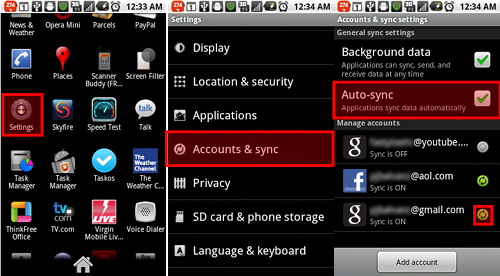
After updating to Android 2.2 and the newest version of the Gmail app, I recently noticed that the app was no longer notifying me of new messages.  Any time I would open the Gmail app I had to manually check for new mail.  Doing a quick search on the internet resulted in zero hits with an answer to what happened.  After doing some digging I managed to find the root of the cause.  The most logical place to start was the app settings.  Clear as day in the setting you will see a check box for "Email Notifications", but in my case this was already checked.  So it was time to dig a little deeper.  Being an android phone it's already linked to my Gmail account, but why would that affect the app?  After a long search in the phone settings I came across something I had never really payed attention to before.  In the "Accounts and Sync" menu is the "Auto-Sync" selection, in my case this was turned off for some reason.  Sure enough after turning the Auto-Sync setting back on the Gmail app started chiming in when new mail arrived.  What caused this to happen is hard to say.  Could it have been a glitch in one of the updates, or some rouge app, I may never know.  But in case you find yourself in the same boat as I was, you will find the steps to fix it below.

Wednesday, May 11, 2011

Skyfire Browser - App Review

Skyfire Browser
Price: FREE

A few weeks back I reviewed the Opera Mini Browser.  To date this is still my go to browsers for daily use, but Opera Mini has it's limitations. So what if you have a page that just doesn't look right or work correctly?  Time to bring out the big guns, behold the SkyFire Browser.  The feature I like the most about this browser is the fact that it can trick webpages in to thinking it's a desktop computer.  So many times I have been stuck on mobile sites unable to get what I need, switching to SkyFire does the trick.  Scripts also seem to be more compatible with Skyfire compared to Opera Mini, and overall webpages look correct as the layouts seem to transfer better.  Sadly it's strong points are also it's weaknesses, as the fact that it loads the pages exactly as they should be seems to make it extremely slow compared to Opera Minis compressed pages.  Overall I find it a great backup when you need full functionality of the web.

Friday, May 6, 2011

TV.com App Review

TV.com
Price: Free

Featuring full episodes of many of the most recent CBS shows, Classic TV like Star Trek, MacGyver, Beverly Hills 90210 and more.  A full list of channels can be found below.  The app is ad supported, typically with only one commercial placed in the normal break for the show, so overall the viewing experience is pleasant.  App design is easy to understand and performance is great even on some of the low end smart phones.  Most videos are available over 3G and Wifi with only a select few Wifi only.  Video resolution is scaled down a bit on 3G but is not unbearable to watch.  A larger selection would be nice as the CBS shows typically only have the most recent episode or two, but overall a great way to kill some time.

TV.com App - Pro's

  • High resolution streaming video on Wifi
  • Decent selection of full episodes
  • Easy to use layout
  • Works even on low end phones


TV.com App - Con's

  • Larger selection would be nice - CBS shows only have the most recent episode or two.
  • No option to browse Full episodes only.

TV.com App - Channel List

  • CBS Entertainment
  • CW - Only partial episodes
  • Showtime - Only partial episodes
  • CNET
  • CBS Sports
  • CBS News
  • Gamespot
  • Classic TV
  • MovieTrailers
  • ET
  • Insider
  • Web Shows
  • Chow
  • Smithsonian Channel